
FMEA software: PFMEA, Control Plan and flow diagram under one revision.
PFMEA, Control Plan and process flow diagram, usually kept in separate Excel files, are prepared from the same data in AkaQMS. Each process's risks are written once in the Foundation FMEA and used in every linked part; a change spreads as a draft to all affected product files. Your existing Excel files are imported in bulk, and the output is available in English and German.
Why an FMEA in Excel is not enough
The problem is not writing the FMEA but keeping it current across hundreds of parts. When the same operation is copied into every part, one correction has to be made separately in twenty files.
The same row in twenty files
In AkaQMS a process's risks are written once in the Foundation FMEA. When they change, the affected product files are listed and each one's draft is updated.
Control Plan detached from the FMEA
PFMEA and Control Plan come from the same rows; measurement method, sample, frequency and reaction plan sit next to the FMEA row.
Flow diagram drawn by hand
The process flow diagram is drawn automatically from the operation flow and characteristics; only intermediate steps and symbols are adjusted by hand.
Which revision is on the floor?
An approved revision is frozen; the operator only sees the released Control Plan, and drafts never reach production.
Actions get forgotten
The revision watchdog lists risky rows, overdue actions, closed actions not yet re-rated and revisions of referenced documents in one place.
Customers want different methods
If one customer wants RPN and another AIAG-VDA Action Priority (AP), each product file opens with its customer's template.
Foundation FMEA → family → part
The standard risks of each process are written once in the Foundation FMEA; adding processes to a part brings their rows. Values that vary from part to part, such as dimension, tolerance or mould, stay as placeholders and are filled in the product file.
- Three layersFoundation FMEA → Family (optional) → Product file. Each part has one product file (FMEA-00001). A starter package for companies starting from scratch: six typical processes from receiving to final inspection and packaging.
- New product fileType the part number and tick the processes in the order they are done; numbers (10, 20, 30…) are assigned automatically. A summary shows how many PFMEA rows, Control Plan characteristics and flow steps will be created. Values are entered now or later; "fill from a similar part" brings a sibling part's values. A file with empty fields cannot be sent for approval.
- The source of every row is visibleA thin line on the left of the row shows its source: Foundation FMEA, family or part-specific. When a Foundation row changes in a part, you choose: write it to the Foundation FMEA so it spreads to all parts, or keep it in this part only. A row that does not apply is excluded with a reason.
- Part-specific operationWork done for one part only (e.g. laser marking) is added to that part's flow without cluttering the Foundation FMEA.
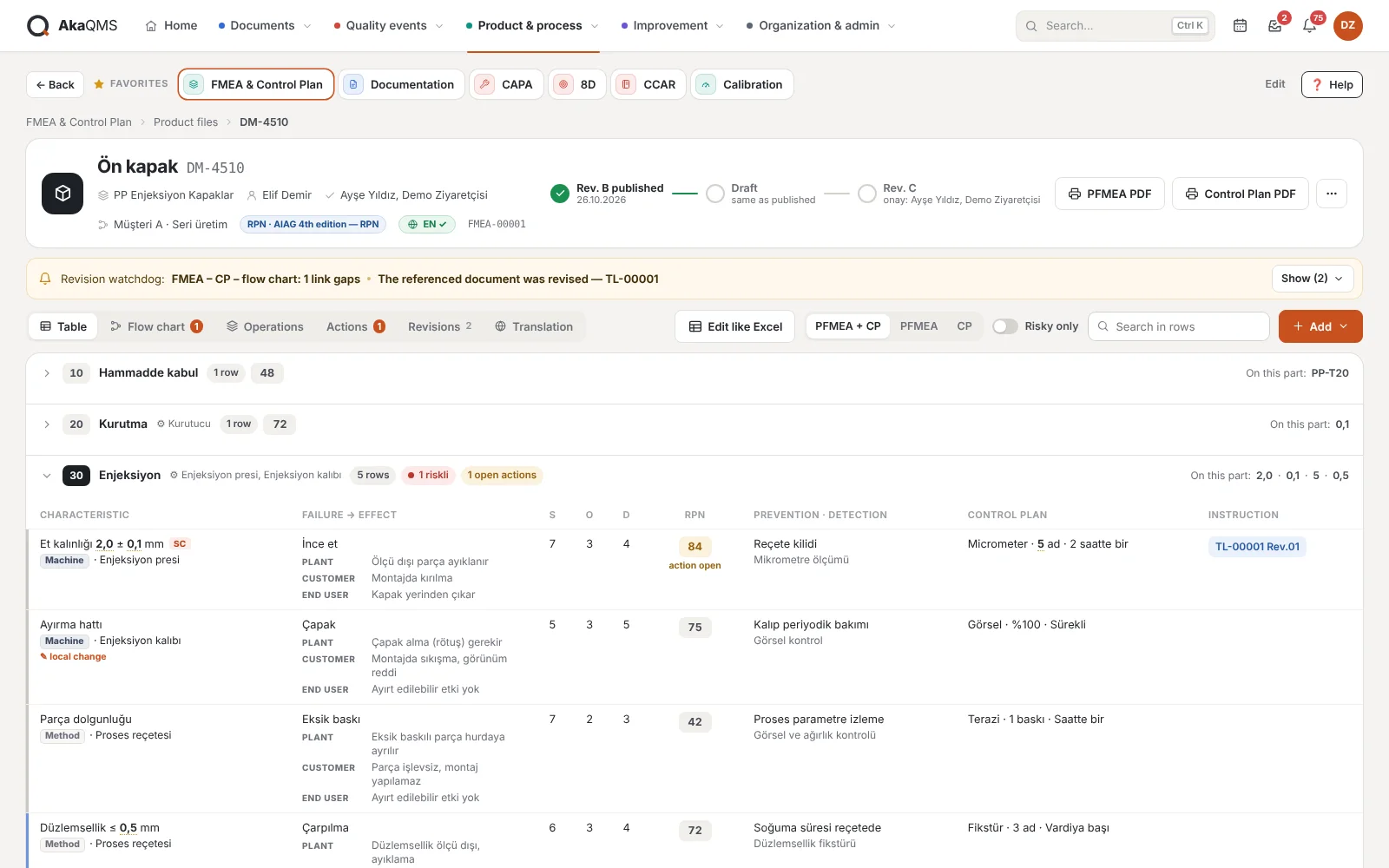
- PFMEA + CP in one tablePFMEA only or CP only views if you prefer, a "risky only" filter and row search.
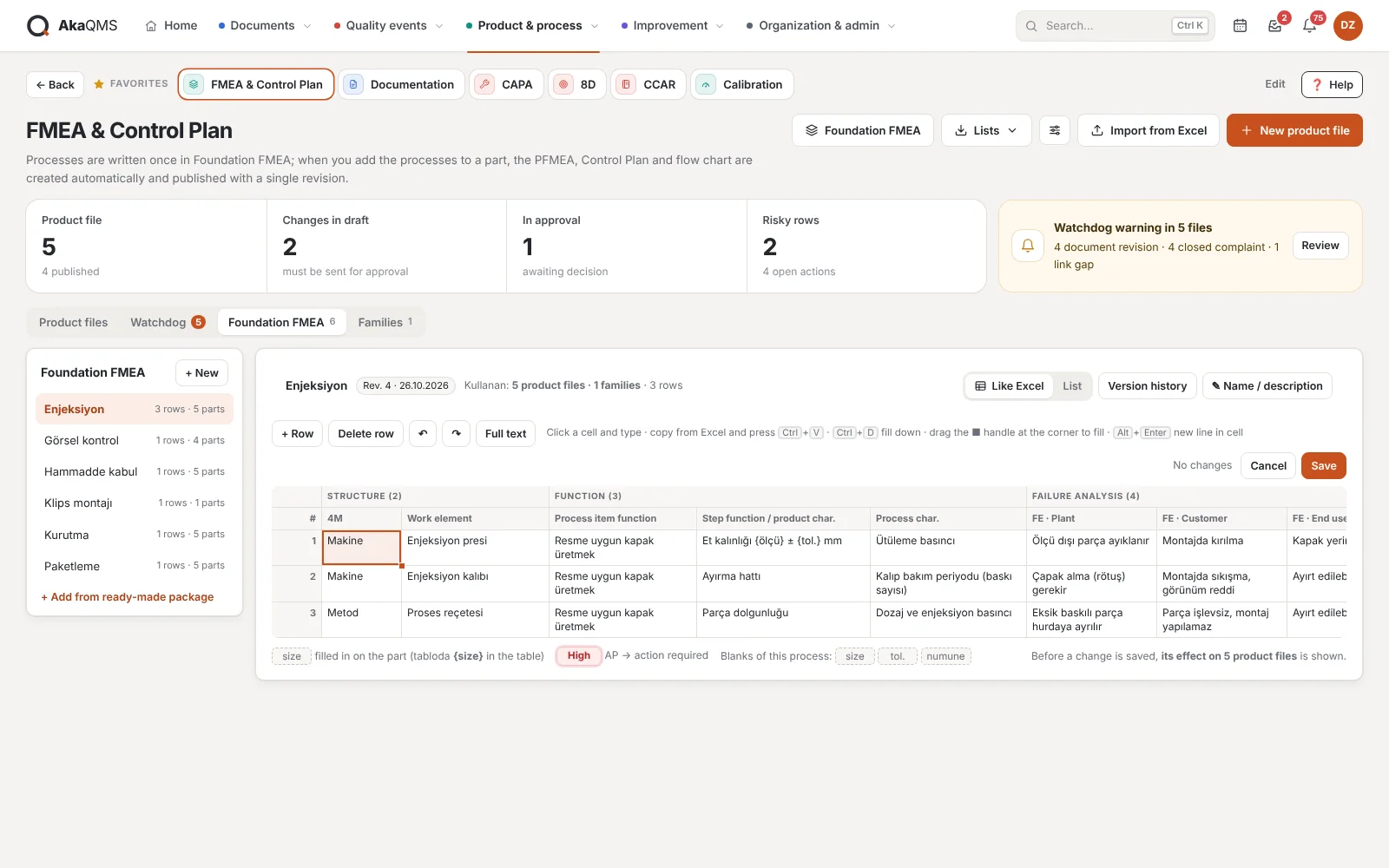
AIAG-VDA layout, filled like Excel
Foundation FMEA rows follow the AIAG-VDA steps and are filled in an Excel-like grid. The same grid edits families and the product file.
- Structure and function4M work element (Man, Machine, Material, Method, Environment, Measurement), function of the process item, product and process characteristic.
- Three-level effectThe failure effect is written separately for Plant, Customer and End user; prevention and detection controls, AP calculated live from S-O-D, filter code and remarks.
- Machine column filled in"Machine" work elements go into the Control Plan's machine, device, fixture column and into the flow diagram.
- A grid like ExcelType into cells, move with the keyboard, copy and paste from Excel, fill down with Ctrl+D and the fill handle, undo / redo. Checked before saving; the affected product files are shown.
- Action typeAn action is opened as a prevention action (O drops) or a detection action (D improves); the AIAG-VDA output shows them in separate columns.
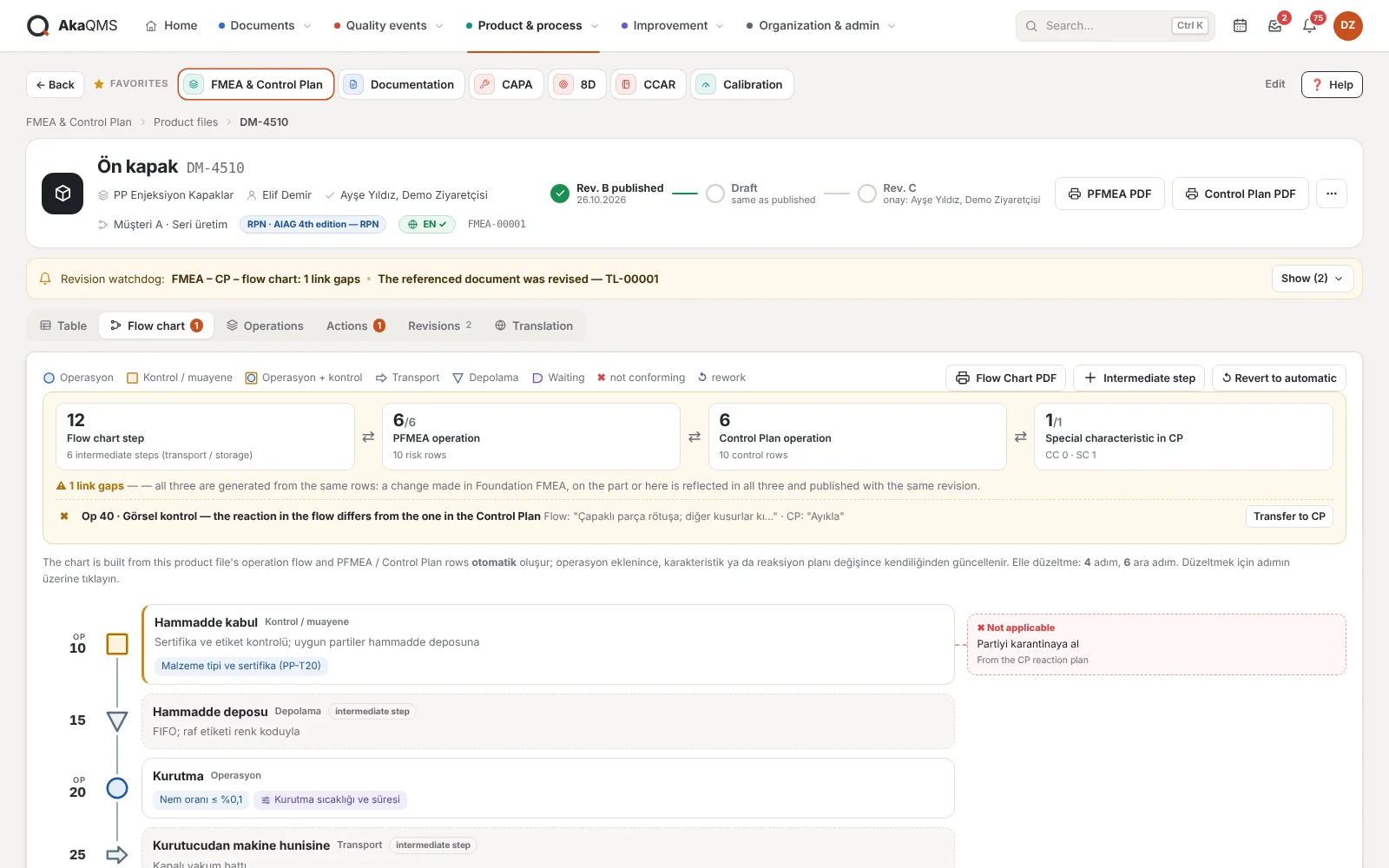
Process flow diagram generated from the FMEA
The flow diagram is drawn from the product file's operation flow and its PFMEA / Control Plan rows. When an operation is added, or a characteristic or reaction plan changes, the diagram updates too.
- Information per stepProduct and process characteristics, CC/SC marks, and the "if not OK" reaction at inspection steps (from the Control Plan).
- Manual adjustmentsSymbol (operation, inspection, transport, storage, waiting), notes, rework loops and intermediate steps such as storage and transport.
- Together with the revisionFlow diagram, PFMEA and Control Plan are released with the same revision; old revisions are kept frozen.
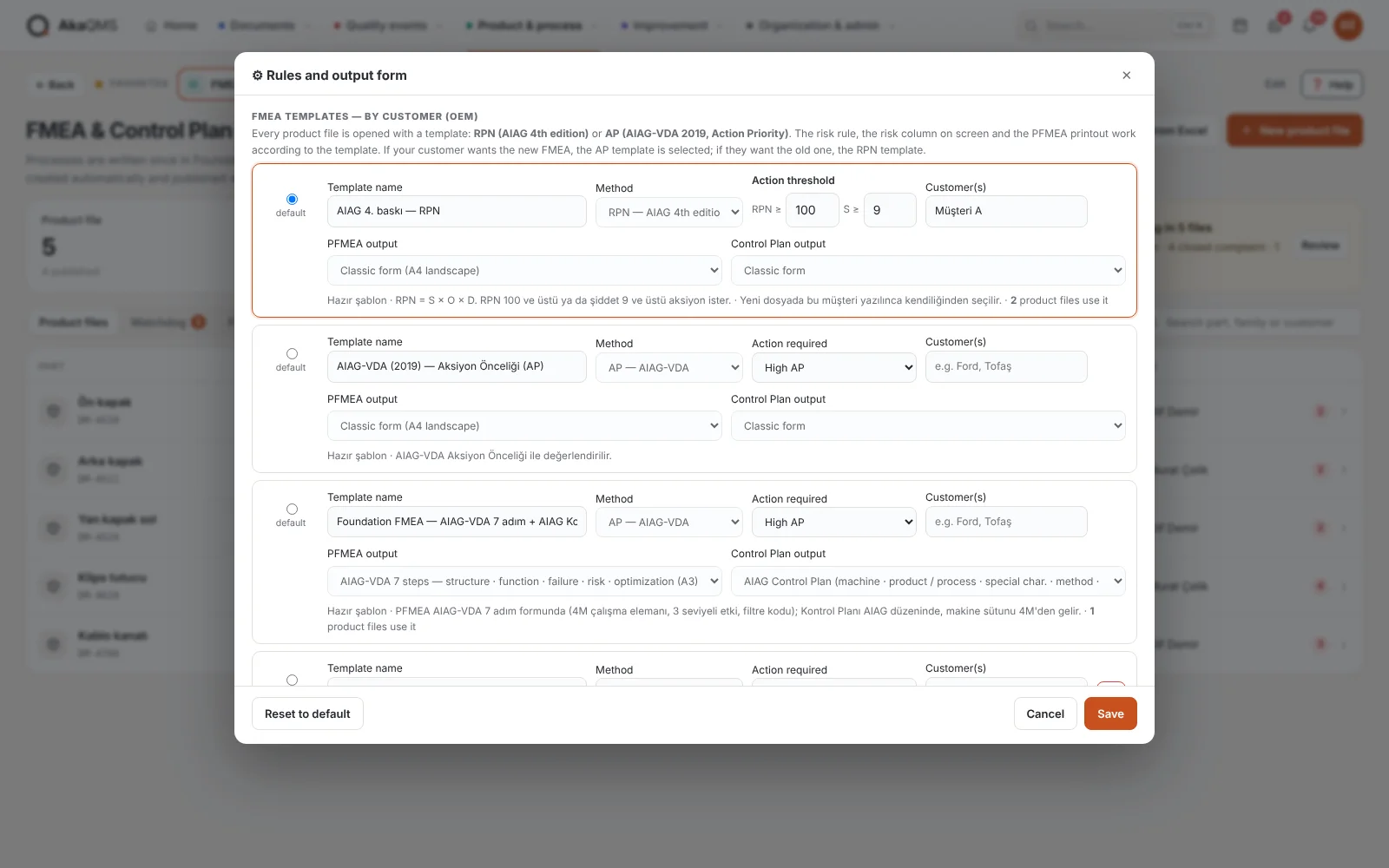
RPN or AIAG-VDA Action Priority
A product file opens with a template: AIAG 4th edition with RPN, AIAG-VDA (2019) Action Priority or Foundation FMEA (PFMEA in the AIAG-VDA 7-step form, Control Plan in the AIAG layout). The risk rule, the risk column on screen and the output form follow the template.
- Per customerIf a customer name is written on the template, it is selected automatically for that customer's new files.
- Thresholds in the templateRPN and severity thresholds, or customer requirements such as "action at Medium AP too", are kept in the template.
- Special characteristic symbolsCC and SC are always there; extra symbols your customer requires are added to the rules and chosen in the row.
- The method is frozen with the revisionA released revision is kept with the method of its day; even if the template changes, the old output does not.
Import your Excel FMEAs and Control Plans in bulk
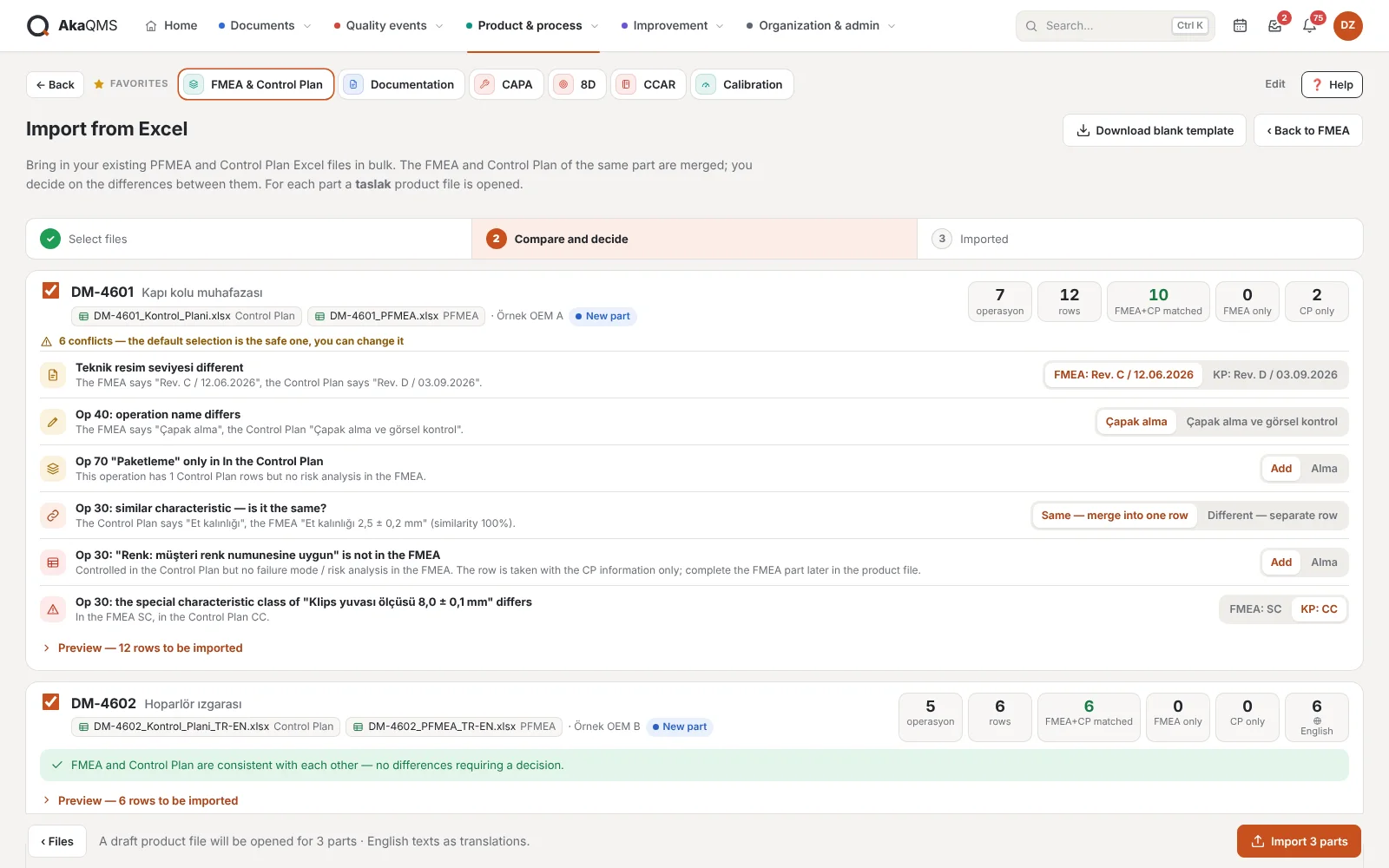
Drag and drop your existing PFMEA and Control Plan Excel files together. AkaQMS recognizes whether each file is a PFMEA, a Control Plan or both in one sheet, and opens a draft product file for each part.
- Your own formColumns are found by their header text, not by position (Turkish or English); forms with a different column order are read too. Which column went to which field is shown one by one. A blank template is ready for those without a form.
- FMEA and CP are comparedA part's two documents are matched row by row by characteristic name. Differences between hand-made documents go to a decision list: different operation name, operation or characteristic present in only one, different CC/SC class, similarly written characteristic, different drawing level.
- Safe defaultsEvery difference comes with a safe choice that you can change. An existing product file is never overwritten; the files opened are drafts, and you send them for approval.
- Bilingual cellsFor cells written as "Turkish (English)", the English part is taken as the FMEA's English translation. Recommended action, owner, due date and result ratings come in as actions.
FMEA output in English and German
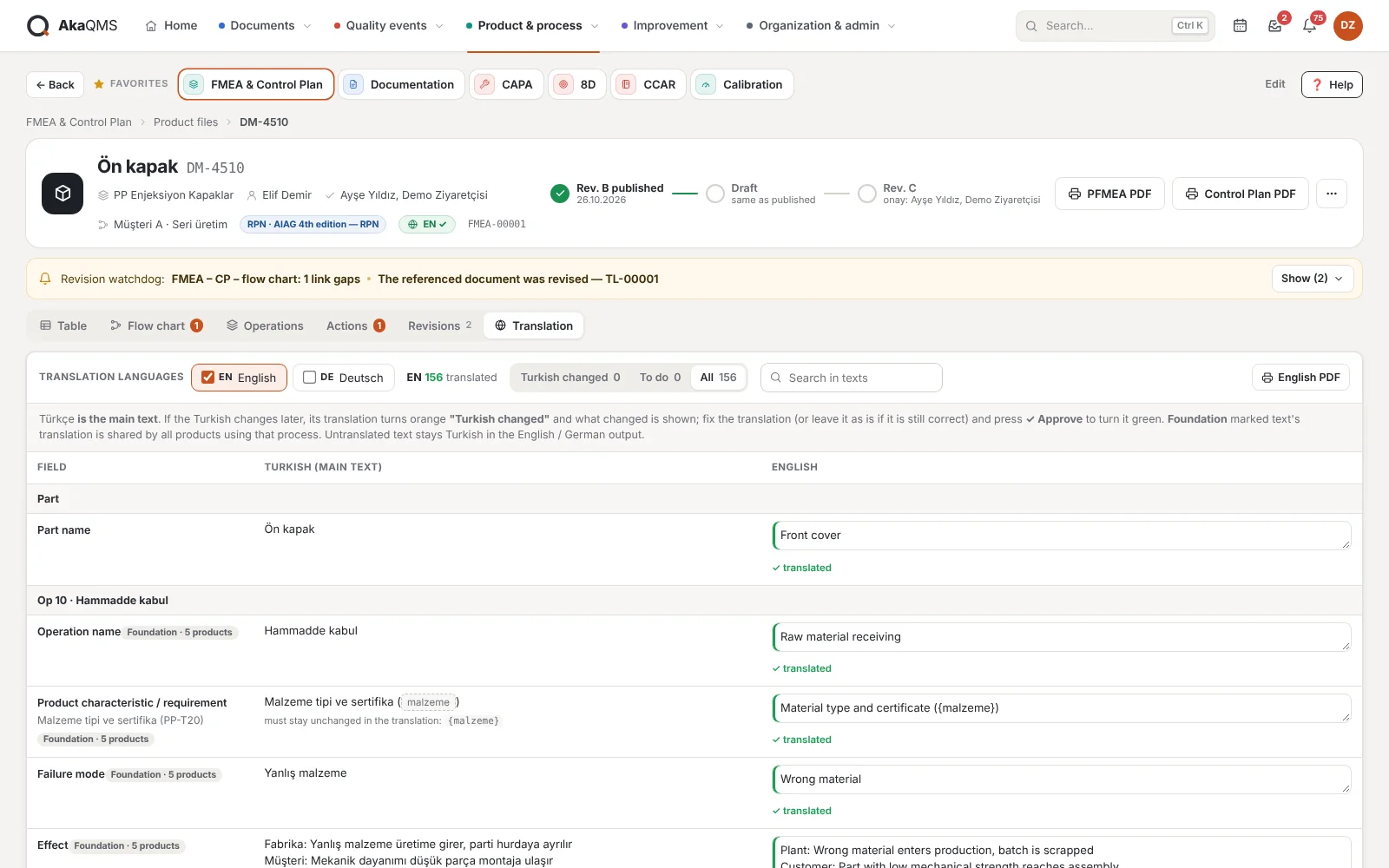
If your customer wants the FMEA in English or German, translate the texts once in the product file's Translation tab; Flow Diagram, PFMEA and Control Plan are printed in that language. Form headings and fixed texts are ready.
- Your own translationThere is no machine translation; your company translates the text. If the same Turkish text has been translated in another part, it is offered as a suggestion. A Foundation FMEA text's translation applies to every part that uses it.
- Warns when the source changesWhen the Turkish source of a text changes, its translation is flagged "needs update" and the difference between old and new is shown; the revision watchdog lists missing and outdated translations.
- No outdated translation is printedText without a translation is printed in Turkish and highlighted on screen.
Revision, approval and output
Changes accumulate in the draft and are released as a new revision (Rev. A, B, C…) once approved. The revision note is written automatically from the differences.
- Approver chosen in the fileEach product file has its own approvers; the approval notification goes to them.
- Revision watchdogRows above the template's threshold, overdue actions, re-rating after a closed action, revisions of referenced documents, the part's 8D/CAPA closure and periodic review.
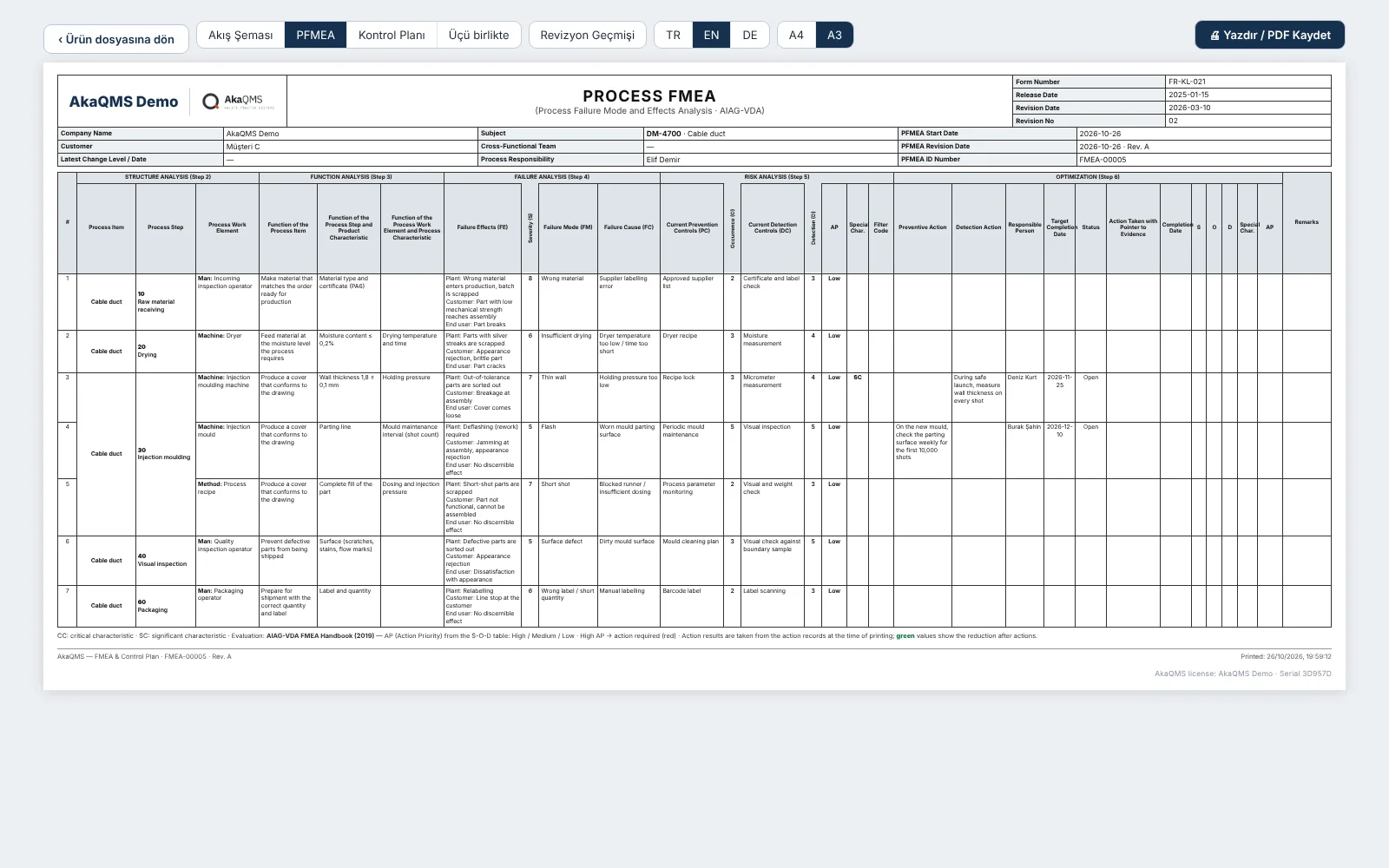
- OutputFlow Diagram, PFMEA and Control Plan; separately or all three together, in English, German or Turkish. With the Foundation FMEA template, the PFMEA prints in the AIAG-VDA 7-step form (A3) and the Control Plan in the AIAG layout, with Safe Launch among the phases. The revision history is a separate page; ratings lowered by an action are shown in green. CSV that opens in Excel; the Control Plan also as an Excel file (.xlsx) in the AIAG layout.
- Link checkFlow diagram, PFMEA and Control Plan come from the same rows; the "if not OK" written in the flow goes into the Control Plan's reaction plan. Special characteristics without a control method, steps without PFMEA rows and inspection steps with an empty reaction are listed.
- On the operator screenWhen the part number is typed, the released Control Plan, PFMEA and flow diagram open as PDF.
- ListsRevision history list of all parts and family – part list; Excel or printable A4.
Questions about the FMEA software
Can we import our FMEAs and Control Plans from Excel?
Yes. With "Import from Excel" you upload several Excel files together; the PFMEA and Control Plan of the same part are merged, you decide on the differences between them, and a draft product file opens for each part. Columns are recognized by their header text; if your form is very different, we define its layout together during installation.
Can we give our customer the FMEA in English or German?
Yes. Translate the texts once in the product file's Translation tab; Flow Diagram, PFMEA and Control Plan are printed in English or German. There is no machine translation; your company does the translation, and when the Turkish source changes, the translation is flagged "needs update".
Can we buy only the FMEA module?
Yes. Licensing is per module; FMEA & Control Plan works on its own, and part numbers can be created from the FMEA module. To link a work instruction to a Control Plan row from a document in the system, the Documentation module is needed; without it, the instruction number is written in the control method field.
AIAG-VDA or AIAG 4th edition?
Both. Each product file opens with a template: AIAG 4th edition with RPN, AIAG-VDA Action Priority (AP) or the Foundation FMEA template (PFMEA in the AIAG-VDA 7-step form, Control Plan in the AIAG layout). Your company adds its own templates per customer.
Is there a design FMEA (DFMEA)?
Not at the moment. The FMEA in AkaQMS is the process FMEA (PFMEA) for the production process, managed together with the Control Plan and flow diagram.
Does the data go to the cloud?
No. AkaQMS runs on your company's own server, on the local network; no internet connection is needed. How it works
Working together with the FMEA
8D and CAPA
When the part's 8D or CAPA is closed, the FMEA row's rating is questioned.
Document control
When a work instruction in the Control Plan is revised, the revision watchdog warns.
MSA and SPC Plan
Measurement system analysis and process capability from the Control Plan, with an annual plan.
Let's set up your FMEA together.
Tell us about the current FMEA and Control Plan of a few of your parts, and we will work out the Foundation FMEA structure together. Pricing is quoted based on the modules selected.