Skip to content
AkaQMS · Quality Management SystemLocal network · No internet needed · Per-module license
TR EN
TR EN
Live demo
Quality management system for manufacturers

All of quality management under one roof. Your data on your own server.

One system from document control to calibration, from 8D to FMEA and Control Plan. It runs on your company's own server and local network; no internet or cloud needed, no per-user subscription. The interface is available in English and Turkish.

18modules, one system
1server, one installation
0internet dependency
Figure 1 · HomeReal screen · sample data
AkaQMS home page in English: top menu and favorites, my tasks, the next 14 days and the quality pulse of the last 6 months
FIGURE 1Everyone starts the day on their own screen: items awaiting their approval, upcoming deadlines, overdue work and favorite modules. Interface in English; the sample records are in Turkish.
01 · Familiar problems

Does any of this sound familiar?

The problems that eat up a quality team's day look alike. The common thread is always the same: the information exists, but not in one place, nobody knows which version is current, and nobody sends a reminder.

F-01Documentation

"Which revision is current?"

Procedures sit in three different folders, the work instruction on the shop floor is two revisions behind. When the auditor asks, nobody is sure.

In AkaQMS

Every document in one list, with its approved revision. Old versions stay in the archive; the shop floor always sees the one in force.

F-02CCAR

The morning meeting is on paper

Nonconformities in one Excel file, actions in another. Who closed what and when, which machine is chronic: nobody can tell.

In AkaQMS

The department log works like Excel; Pareto and heat map are drawn automatically, a recurring problem becomes a CAPA with one click.

F-03Calibration

A calibration deadline was missed

The caliper's calibration expired and nobody noticed until audit day. The annual plan is a spreadsheet and nobody sends reminders.

In AkaQMS

Reminders 30 and 7 days before the due date; once completed, the next period opens automatically and the annual plan can be printed.

F-04FMEA & CP

The same FMEA row in twenty files

The operation's risks were copied into every part's file; when one is updated, the others go stale.

In AkaQMS

The row is written once in the Foundation FMEA; when it changes, every affected product file is listed and its draft is updated.

F-05Audit

Panic before the audit

Collecting evidence takes days. 8D reports live in e-mail attachments, audit findings in a Word file.

In AkaQMS

Every clause is a folder; documents and records are linked as shortcuts and always current. Gaps and readiness percentage on one screen, a finding becomes a CAPA with one click.

F-06Operator screen

No Office on the shop-floor PC

The operator cannot open the control plan; it gets printed, the printout ages, and the old printout stays at the line.

In AkaQMS

The operator types the part number and sees the current document in the browser; Excel and Word files are converted to PDF on the server.

02 · New modules

Audit preparation, FMEA, MSA and SPC now in the same system.

Audit folders, Control Plans, measurement system analysis and process capability no longer sit in separate files on a network drive; all of them live in AkaQMS with their deadlines, approvals and history.

New · Audit Preparation

Audit Preparation

A clause-by-clause folder tree for every audit. Documents are not copied but linked as shortcuts; when revised, the folder opens the current one too.

  • IATF 16949, ISO 9001, 14001, 45001 and VDA 6.3 templates, or a copy of last year's audit
  • Readiness percentage and gaps; reminders to owners 14, 7 and 3 days before
  • Full-screen audit day: search, open, "shown"; a CAPA from a finding
Details
New · FMEA

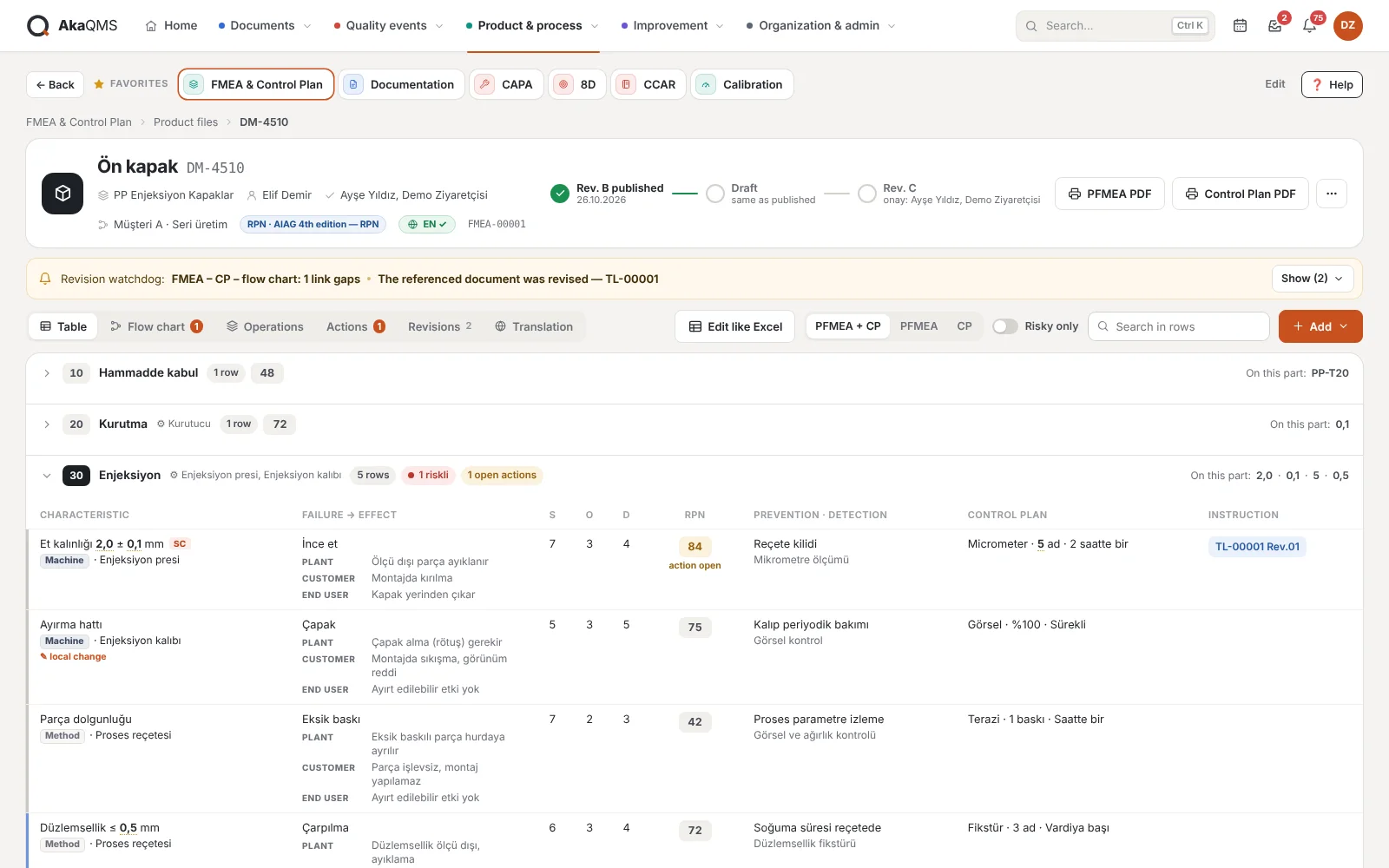
FMEA & Control Plan

PFMEA, Control Plan and process flow diagram from the same data, under one revision. Your existing Excel files are imported in bulk; RPN or AIAG-VDA Action Priority per customer, output in English, German or Turkish.

Details
New · MSA · SPC

MSA and SPC Plan

Measurement system analysis and process capability with an annual plan grid. Enter %GRR, ndc or Cp, Cpk and the system makes the acceptance decision; the next period of an approved study opens automatically.

Details
03 · Modules

Eighteen modules, one system.

Start with the module you need and add more as you grow. Hover over or tap a module to see its real screen.

Figure 2 · Module showcaseReal screen
FMEA product file: PFMEA and Control Plan in one table

FMEA & Control Plan

PFMEA and Control Plan from the same table, with one revision number. A row written once in the Foundation FMEA is used in every linked part.

  • Foundation FMEA → family → part
  • Flow diagram generated from the FMEA
  • RPN or AP per customer
More on FMEA & Control Plan
04 · Modules talk

Work that ends in one module starts in the next.

This is where one system beats separate programs. Hover over or tap a module: the links the product really makes today are drawn.

All links
  • Minor/major finding in an internal audit → an 8D opens automatically
  • Department KPI target missed → a CAPA opens automatically
  • A document is linked to an audit folder as a shortcut → the folder stays current when it is revised
  • Finding in an external audit → CAPA in one click
  • Internal audit records → as evidence in the audit folder
  • Calibration records → as evidence in the audit folder
  • FMEA and Control Plan files → as evidence in the audit folder
  • A problem from the morning meeting → CAPA in one click
  • The part's 8D is closed → the FMEA row's rating is questioned
  • The part's CAPA is closed → the FMEA row's rating is questioned
  • Work instructions and forms in the Control Plan are picked from documents → the watchdog warns when a document is revised
  • The part's documents open to operators → on the operator screen, always current
  • Released Control Plan, PFMEA and flow diagram → as PDF on the operator screen
  • The part's change requests → in the Part File
  • The part's CAPA records → in the Part File
  • The part's 8D records → in the Part File
  • The part's periodic tests → in the Part File
  • Document review dates → Quality Calendar
  • Planned internal audits → Quality Calendar
  • External audit dates → Quality Calendar
  • CAPA deadlines → Quality Calendar
  • 8D deadlines → Quality Calendar
  • Calibration and verification due dates → Quality Calendar and home page
  • MSA periods → Quality Calendar
  • SPC periods → Quality Calendar
  • FMEA action deadlines → Quality Calendar and home page
  • Periodic test deadlines → Quality Calendar
05 · Easy to use

Short training, clean screens.

Clean screens decide whether a system is adopted. In AkaQMS everyone first sees their own work; everything else is one click away. Each user picks English or Turkish, and when you get stuck, support comes from the people who build the system.

My tasks

Personal home page: items awaiting your approval, upcoming and overdue deadlines, your favorite modules on one screen.

One search box

Document number, part number, CAPA, instrument: Ctrl+K searches every module from one box. The operator screen has no menu, only a part number box.

Help inside the screen

A help card on every screen: what it is for, who uses it, how to do it step by step. A short tour on first sign-in.

Fast support

Your request goes to the people who develop AkaQMS, not to a call center. Response times by priority are written in the contract.

06 · How it works

Installed on one server, used in the browser.

The office PC, the screen on the shop floor and the phone in your pocket open the same address; everything is in one database and one archive. Installation and rollout →

One server, one installation

A single program is installed on a Windows server. Nothing is installed on user computers; a browser is enough.

Data stays in the company

No cloud, no external service, no internet connection required. Documents and records sit on your own disk and in your own backup.

Per-module license

No per-user subscription. Start with the module you need and unlock new ones with a key.

Born on the shop floor

Shaped by daily use in an automotive plastic injection plant. Every detail on the screens came from a real need.

See it for yourself.

Try every module with sample data in the live demo, or tell us about your current document structure and morning meeting routine and we will look at it together. Pricing is quoted based on the modules you choose.